Up and running in five minutes.
Download, copy one folder, rescan your DAW, and build. No activation, no account, no internet needed: PREDROP works offline from the first second.
Four steps: download, copy one folder, rescan your DAW, then paste your licence key.
Windows 10 or 11, 64-bit
VST3
macOS 10.13 or later
VST3 + AU · Intel and Apple Silicon
In preparation
The current version is for Windows. The Mac version will be announced on this site.
A 64-bit VST3 host
FL Studio, Ableton Live 10.1+, Cubase, Studio One, Reaper, Bitwig…
Download PREDROP
Right after payment, Polar (our reseller) sends you a confirmation email. It leads to your customer area, where you find the download and your licence key. Keep that email: the key is your proof of purchase for support and future versions.
- Open your customer area from the email (or here, with the email used for the order).
- Download PREDROP_v1.2.1_Windows_VST3.zip (or the macOS file on a Mac).
- Unzip it: right-click › Extract all. You get a PREDROP.vst3 folder and a quick guide (LISEZ-MOI).
Copy the plugin to its folder
- Open File Explorer and go to this folder (paste it in the address bar):
C:\Program Files\Common Files\VST3 - Copy the whole PREDROP.vst3 folder into it. Windows may ask for administrator permission: click Continue.
- In Finder, choose Go › Go to Folder… and paste:Copy PREDROP.vst3 into it.
/Library/Audio/Plug-Ins/VST3 - For Logic Pro, GarageBand and other Audio Units hosts, also go to:Copy PREDROP.component into it.
/Library/Audio/Plug-Ins/Components - Enter your Mac password if asked.
Rescan plugins in your DAW
Most DAWs find new plugins at launch. If PREDROP is not listed, run a rescan. Menu names can vary a little between versions.
FL Studio
Then load HOPS LAB › PREDROP in a Mixer insert slot.
Ableton Live
PREDROP appears under Plug-Ins › HOPS LAB in the browser.
Logic Pro
Logic checks new Audio Units at launch. Insert it from Audio FX › Audio Units › HOPS LAB.
Cubase / Nuendo
Restart Cubase, or rescan from the plug-in manager.
Reaper
PREDROP then appears in the FX browser.
Studio One · Bitwig
Both scan the standard VST3 folder at launch.
Activate with your licence key
- Open PREDROP on any track, with the computer online. The first time, it shows its activation screen (until then, the sound passes through untouched).
- Copy the licence key from your purchase email or your customer area. It starts with
PREDROP-. - Click PASTE (or paste it into the field), then ACTIVATE.
- Done. PREDROP remembers the activation on this computer, in every DAW and every project, and works offline from now on.
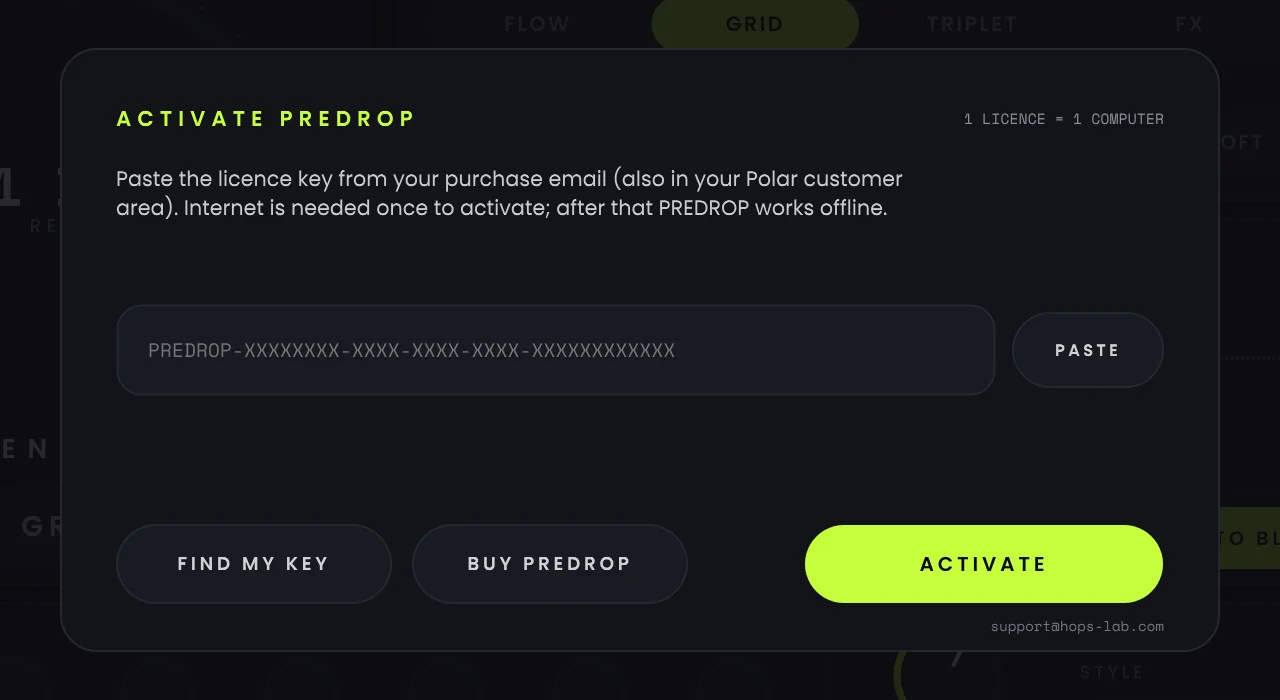
The activation screen, inside PREDROP.
Your first build in one minute
- Put PREDROP on the track, group or bus you want to build (the whole drums + music bus is a great start).
- Open the preset menu and load Club Build 4 Bars.
- Automate GRAB: on at the start of the build, off exactly on the drop. In FL Studio: right-click GRAB › Create automation clip, or Tools › Last tweaked › Create automation clip.
- Press play. AUTO RAMP builds the tension, AUTO BLACKOUT silences the last beat, and the drop lands.
Optional: drive GRAB with MIDI notes
Turn on MIDI GRAB in the ADVANCED panel (sliders icon), then send notes to PREDROP. While a note is held, GRAB is held.
FL Studio
Plugin gear icon › MIDI › Input port: pick a number (e.g. 10). Add a MIDI Out in the Channel Rack on the same Port and draw notes in its piano roll.
Ableton Live
On a MIDI track, set MIDI To to the track holding PREDROP, then to PREDROP.
If something doesn't work
PREDROP doesn't appear in my DAW
Check that PREDROP.vst3 is directly inside the VST3 folder from step 2 (not inside another folder), then rescan or restart your DAW. Your DAW must be the 64-bit version. In Ableton Live, "Use VST3 Plug-In System Folders" must be on.
macOS says PREDROP is damaged or can't be opened
macOS flags files downloaded from the internet. Open Terminal, paste these two lines one after the other, enter your password, then restart your DAW:
sudo xattr -dr com.apple.quarantine /Library/Audio/Plug-Ins/VST3/PREDROP.vst3sudo xattr -dr com.apple.quarantine /Library/Audio/Plug-Ins/Components/PREDROP.componentMy licence key is rejected
PREDROP shows the reason under the key field:
- Key not found: copy the whole key, from
PREDROP-to the last character. The FIND MY KEY button opens your customer area, where the key is. - Already active on another computer: deactivate it on the other computer (ADVANCED, then DEACTIVATE) or from your customer area, then click ACTIVATE again.
- No internet connection: activation needs internet once. Check the connection, or allow your DAW through the firewall, and try again.
Still stuck? Contact us with your order number.
I lost my licence key
It is always in your customer area: sign in with the email address used at checkout (the FIND MY KEY button in PREDROP opens it). You can also search your inbox for "PREDROP". Still nothing? Contact us from that email address.
The loop isn't in time with my track
PREDROP follows your DAW's tempo and beat grid, so press play in your DAW before you GRAB. Check that your project tempo matches the track.
I can't find PREDROP under "PREDROP Audio" any more
Since version 1.2, PREDROP is published by HOPS LAB: your DAW lists it under HOPS LAB after a rescan. It is the same plugin, and your projects still find it.
MIDI GRAB does nothing
Check that MIDI GRAB is on in ADVANCED and that notes really reach PREDROP: the dot on the MIDI GRAB card lights up when they do. In FL Studio, the MIDI Out port and the plugin's input port must be the same number.
Where are my presets? Can I move them to another computer?
In Documents\HOPS LAB\PREDROP\Presets (the preset menu has an "Open presets folder" entry). Copy the .pdpreset files to the same folder on the other computer.
The sound is too loud, or it clips
Open ADVANCED: lower OUTPUT, and keep LIMIT on. Nothing then leaves PREDROP above −0.3 dBFS. If a build is too intense, lower MACRO or pick a softer STYLE (VELVET or CLEAN).
Still stuck?
Tell us your system, your DAW and what you see. We will help you get it running.